
Free tool / Google Maps ranking
Google Maps Rank Checker: Where Does Your Business Rank Around Town?
Google Maps shows different results on every block. See your position on a 25-point map around your business, and which competitors win each area.
Free, no sign-up. For businesses anywhere in the United States. Results in about 10 seconds.
What we check / 25-point map
What the Google Maps Rank Checker Shows You
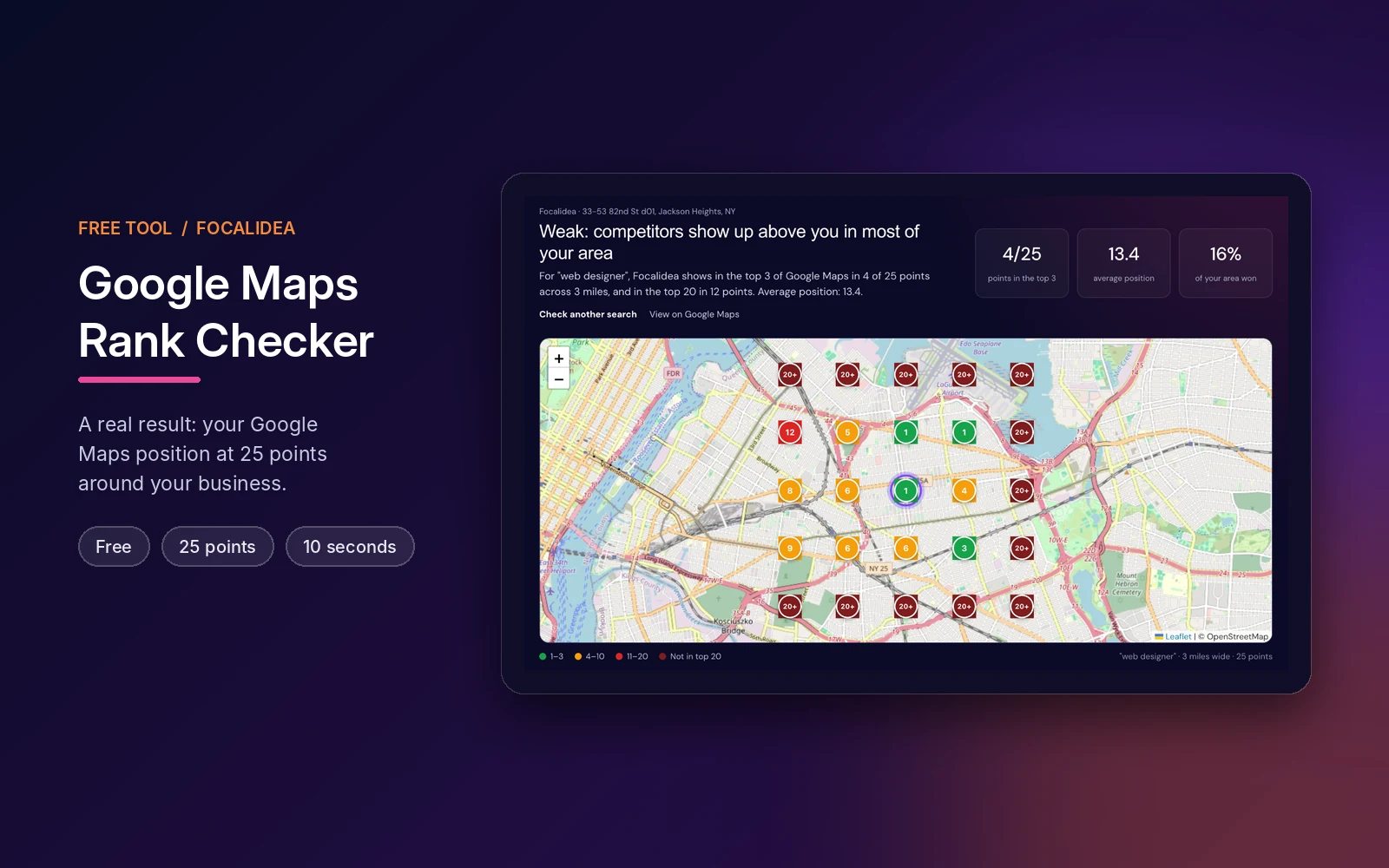
Google Maps ranks businesses differently on every block. The checker searches Google Maps from 25 points around your business and shows where you win and where you disappear.
- 25 points around you
- Any search term
- Free, no sign-up
Your Rank at Every Point
A map with your Google Maps position at 25 points, 1, 3 or 6 miles wide, colored from top 3 to not in the top 20.
Who Wins Each Area
The competitors that take the top 3 most often across your area, with their reviews and average position.
Average Position and Top 3 Share
Two simple numbers to track over time: your average position and how much of your area you win.
Definition
What Is a Local Rank Grid?
A local rank grid checks the same Google Maps search from many points around a business. Because Google ranks local results partly by distance to the searcher, a business can be number 1 on its own block and missing a mile away. The grid shows that difference on a map.
Prefer an expert review?
Get a free manual audit of your Google Business Profile, including posts, Q&A and review replies.
How it works / 3 steps
How the Maps Rank Checker Works
Real Google Maps results, checked from 25 locations at the same time.
Pick it. Search it. Map it.
-
01
Find Your Business
Type your business name and city, or paste your Google Maps link, then pick it from the list. Works for businesses anywhere in the United States.
You get: your exact Google Maps listing. -
02
Enter the Search
Type what customers search for, like "plumber" or "nail salon", and choose an area 1, 3 or 6 miles wide.
You get: a 25-point grid around you. -
03
See Your Ranking Map
In about 10 seconds you see your position at every point, your average position and the competitors that win your area.
You get: a clear picture of where to improve.
Your results / What the map means
How to Read Your Google Maps Ranking
Most clicks on Google Maps go to the top 3 businesses. The share of your map where you are in the top 3 is the number that matters most.
Under 30% top 3
Weak
Competitors show up above you in most of your area. You may only rank near your address.
- Fix your main category first
- Close the review gap with the leaders
- Add your neighborhoods to your website
Needs attention
Ask our AI assistant
30% to 59% top 3
Mixed
You win close to your location, but lose customers a few blocks away.
- Post updates and photos every week
- Build local links and citations
- Check again in 30 days
Room to grow
60% top 3 or more
Strong
You own the map pack in most of your area for this search.
- Check other services you offer
- Try a wider area
- Keep reviews coming every week
Keep it up
A website checker reviews one page at a time. For a complete picture of your rankings, competitors, and Google data, ask for our free SEO audit in NYC or see how much SEO costs in NYC.
Comparison / Tool vs. expert
Free Rank Checker vs. Local SEO by Focalidea
The checker shows where you stand today. Our local SEO team works to move you into the top 3 across your area.
| Factor | Free Maps rank checker | Local SEO by Focalidea |
|---|---|---|
| Cost | Free ✓ | Monthly plan, free consultation ✓ |
| Time to results | About 10 seconds ✓ | Weeks to months ! |
| Searches checked | One search at a time ! | All your services ✓ |
| Tracking over time | Run it again yourself ! | Monthly ranking reports ✓ |
| Fixes your profile | Shows what to fix ! | Done for you ✓ |
| Works for any US business | Yes ✓ | NYC focus, US-wide available ✓ |
Why it matters / Since 2003
Why Your Google Maps Ranking Changes Block by Block
For a local business, your Google profile is often the first thing customers see, even before your website. In New York, dozens of competitors are a few blocks away, and Google shows only three on the map first.
- 23+Years
- ★ 5.0Google rating
- EN / ESBilingual
Want help with your results?
Talk to our Local SEO team in New York, in English or Spanish.
-
01
Distance Changes Everything
Google ranks local results by relevance, distance and prominence. The closer a searcher is to a competitor, the harder it is to beat them there.
-
02
The Top 3 Get Most of the Calls
The map pack shows three businesses first. Ranking 4th or lower in an area means most customers there never see you.
-
03
One Search From Your Desk Is Misleading
When you search from your own shop you see your best position. Customers a mile away see something very different.
-
04
A Map Shows Where to Grow
Knowing which neighborhoods you lose, and to whom, tells you where to focus reviews, local pages and links.
Google Maps Rank Checker Questions
01How does the Google Maps rank checker work?
It runs the same Google Maps search from 25 points in a grid around your business, 1, 3 or 6 miles wide, and records your position at each point. The result is a map, your average position and the share of your area where you are in the top 3.
02Is the rank checker free?
Yes. The map, your average position and the competitor table are free with no sign-up. Enter your email to see the names of the competitors that win each area and a plan to rank in more of your area.
03Why is my ranking different a few blocks away?
Google ranks local businesses by relevance, distance and prominence. Distance to the person searching changes the results, so a business can rank first on its own block and not appear a mile away.
04What should I type as the search?
The words a customer would type in Google Maps, without the city name, for example "plumber", "nail salon" or "pizza". Check each main service separately.
05What does "20+" mean on the map?
Your business did not appear in the top 20 Google Maps results at that point. Most customers never scroll that far.
06How can I rank in more of my area?
Use the right primary category, get reviews every week, post updates and photos, add your service areas and neighborhoods to your website and build local links. Our local SEO team can do this for you.
07Does it work outside New York City?
Yes. You can check any business with a Google Maps location in the United States. Service-area businesses that hide their address cannot be mapped.
08How often should I check my ranking?
About once a month. Rankings change during the day and over time, so compare the same search and the same area size each time.
Related Tools and Services
Trusted Google Business Profile Resources
Free consultation / English & Spanish
Want the Top 3 Across Your Whole Area? Let's Get You There.
Send us your Google Business Profile report and get a free consultation with a written plan to grow your reviews, photos and local visibility.
- ★ 5.0 Google rating
- Since 2003
- Jackson Heights, Queens